✦ littleforge.appExplore the apps ↗

04 / A LITTLE CLOSER TO YOUR DEVICE

tinyTerm

An interactive console when you need it.
A command composer when you want it.

A compact native serial terminal inspired by GTKTerm and CuteCom. Read your device’s output, inspect the bytes, and keep your useful commands close.

Download tinyTerm ↓

Version 0.1.16 · 2026-11-19 · Linux & Windows
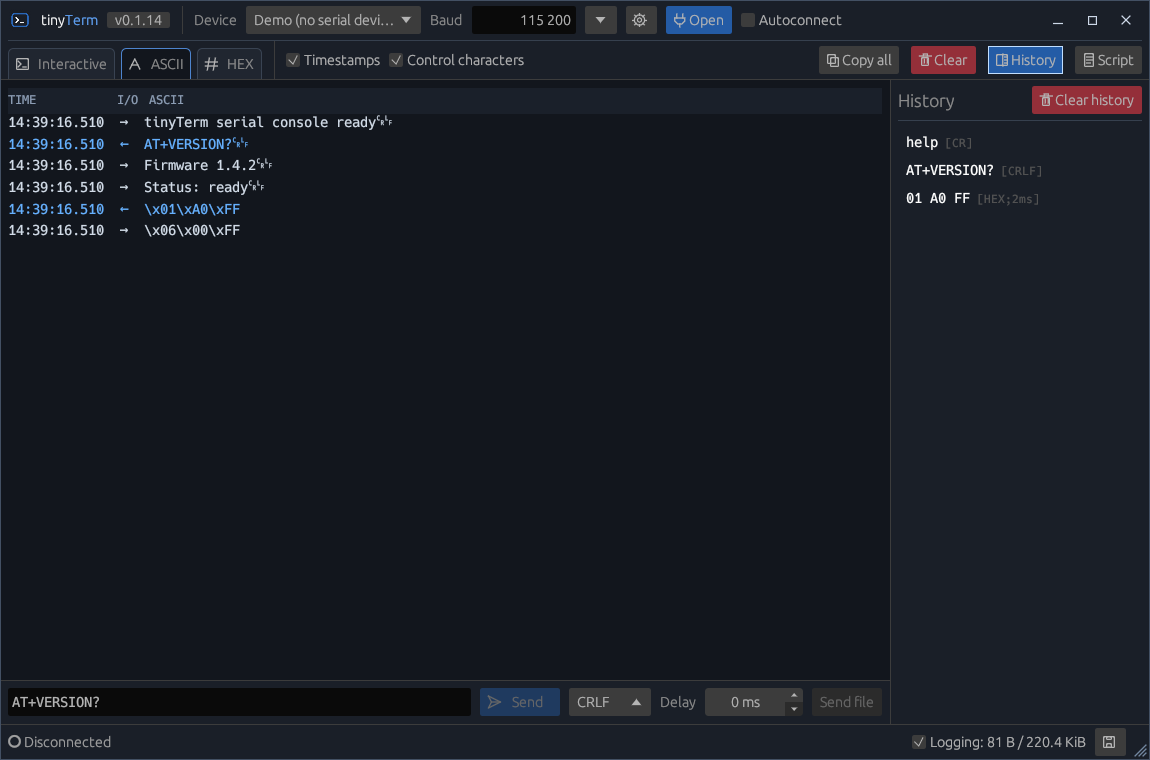
tinyTerm showing timestamped serial traffic, command history and a script with Send, Wait and Pause steps

BUILT TO FEEL RIGHT

Why another serial terminal?

I couldn’t find a serial terminal that felt completely right for me. I liked GTKTerm’s interactive console and CuteCom’s command-based workflow, so I built tinyTerm to bring those features together in one compact interface.

Features

Interactive, ASCII & HEX

Work in an ANSI/VT100 console or inspect the same RX/TX traffic as text and bytes. Use colors, scrollback, timestamps, control characters and linked HEX selection.

Commands & file transfers

Keep commands with their format and byte delay, or add them to scripts. Send files as plain text, Xmodem or Ymodem, with progress, pause, cancel and repeat controls.

Scripts

Arrange Send, timed wait, RX text or regexp wait, and Pause steps. Run, pause or stop, reorder steps, lock your script, and save or load readable JSON files.

Logging you control

Keep RX/TX traffic without a fixed size cap. See data and metadata sizes, clear the screen independently, or switch logging off after saving or discarding retained data.

Portable log exports

Save raw text, timestamped text, or a self-contained HTML log with VT100, ASCII and HEX views, linked selection and text downloads. Try the interactive HTML log ↗

Crash recovery

Traffic is checkpointed locally every five seconds. Browse stored sessions after an interruption, recover a log without retransmitting commands, or discard it.
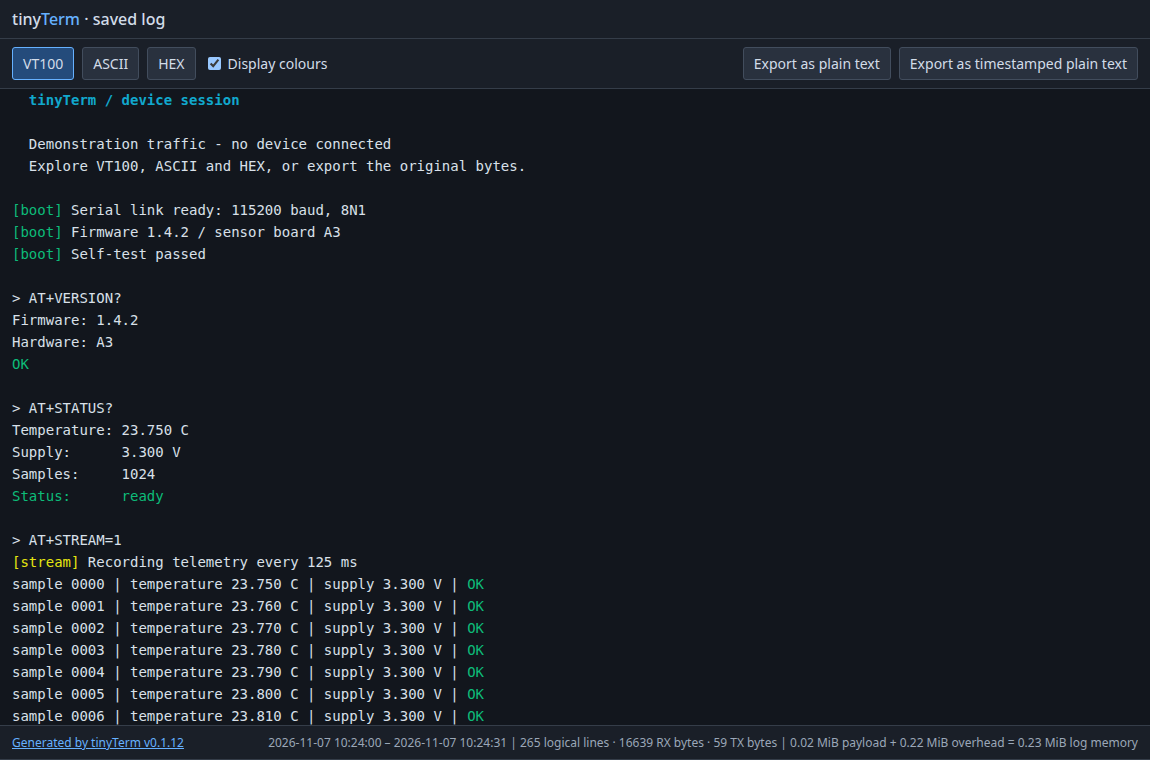
Interactive exported HTML log showing a device session with VT100, ASCII and HEX tabs
A real HTML export with demonstration traffic. Open the interactive demo ↗
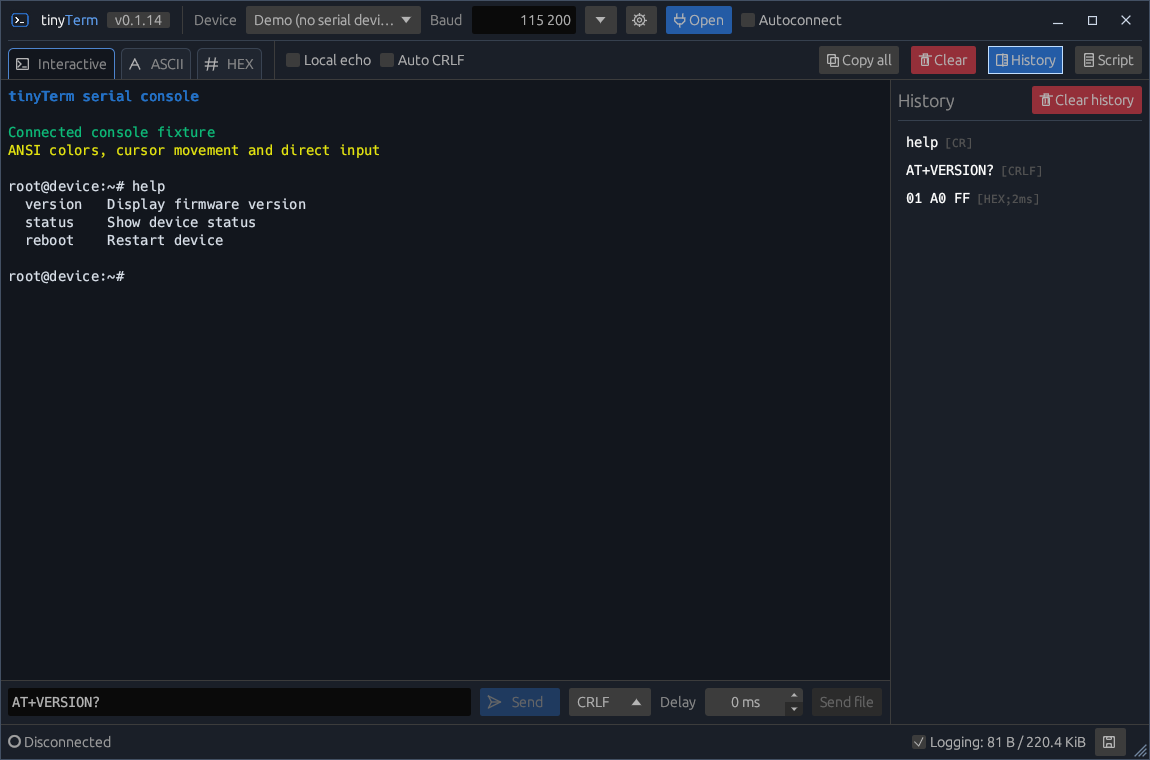
Interactive terminal displaying an ANSI color console
Work directly in an interactive ANSI console.

Screenshots use demonstration traffic.

TAKE IT WITH YOU

Download tinyTerm 0.1.16

No account. No installer. Pick your platform.

Linux

One AppImage · x86-64 · 9.5 MiB

Download AppImage ↓

Ubuntu 22.04 or newer, or a compatible distribution with glibc 2.35+, a graphical session and OpenGL drivers. Native save dialogs use your desktop’s xdg-desktop-portal service and backend.

How to run

Make the downloaded file executable, then open it:

chmod +x tinyTerm-0.1.16-linux-x86_64.AppImage
./tinyTerm-0.1.16-linux-x86_64.AppImage

If your system has no FUSE 2 support, use extraction mode:

./tinyTerm-0.1.16-linux-x86_64.AppImage --appimage-extract-and-run

Choose Install locally on first run to add tinyTerm to your applications menu. The confirmation shows the application and launcher paths. You can also install or upgrade the local copy from About.

Serial ports may require membership in your distribution’s serial-device group, often dialout.

Windows

One portable EXE · x86-64 · 39.2 MiB

Download EXE ↓

Windows 10 or newer. Uses DirectX 12, with OpenGL as a fallback. Download the file and run it; no installation or companion DLLs needed.

Graphics compatibility

If graphics initialization fails, tinyTerm automatically retries with OpenGL. You can also force OpenGL from PowerShell:

.\tinyTerm-0.1.16-windows-x86_64.exe --opengl

The About window shows the active renderer.

Unsigned application

This release is unsigned, so Windows may show a reputation warning. Verify the download source and checksum before choosing to run it.

SHA-256 checksums · MIT license · Third-party licenses

The desktop app has no telemetry. This page counts download clicks by platform using LittleForge’s cookie-free Umami analytics, respecting Do Not Track, Global Privacy Control and the shared local opt-out. Optional daily update checks ask for confirmation before downloading and installing the verified binary for your platform; your serial data, device details and command history stay on your computer. Recovery checkpoints now save serial traffic in your local application-data directory; they are not uploaded.

WHAT’S NEW

Changelog

0.1.16 — 2026-11-19

  • HTML log viewer: one selection is shared by the VT100, ASCII and HEX views, so whole lines can now be selected in ASCII and VT100 too. Switching tabs keeps the selected line (or, with nothing selected, the top line) where it was on screen. Copy follows the current view, and Escape clears the selection.

0.1.15 — 2026-11-18

  • Shrink Interactive HTML log exports by storing one deflate-compressed copy of the traffic and rendering the VT100, ASCII and HEX views in the browser; the 20,000-line test fixture drops from 5.6 MB to 103 KB.

0.1.14 — 2026-11-11

  • Add a saved Auto CRLF checkbox in Interactive mode to insert CR before received LF-only line endings, including across serial reads, without changing captured or transmitted bytes.
  • Explain why Send is disabled when the port is closed, another send or transfer is active, or command encoding is invalid.

0.1.13 — 2026-11-10

  • Add Send file after Delay with Plain text, Xmodem and Ymodem transfers, pause/resume, cancellation and repeat.
  • Show a movable progress toast at the top of the active terminal pane, with a right-aligned ETA updated once per second, centered byte counts and red Cancel/Close buttons. Completed and cancelled status appears beside the buttons.
  • Expand the command input to fill the available row beside its controls.

0.1.12 — 2026-11-08

  • Start the update immediately from About’s Download and Install button, without a second confirmation.
  • Handle stale X11 dialog-window queries during update/About transitions without leaking errors into the window backend; reuse native dialog icons.
  • Always open About when clicking the version, including when an update is available; keep Download and Install inside About.

0.1.11 — 2026-11-08

  • Check for updates only at startup; remove daily checks while the app stays open and keep manual checks available.

0.1.10 — 2026-11-08

  • Check for updates on every startup when enabled, even after a recent check. Show a five-second bubble and five version-button pulses for available updates, then retain the accented version button for reviewing the update.

0.1.9 — 2026-11-08

  • Show byte/percentage progress while downloading updates, display installation status, and offer Restart now or Later after success; preserve the log-save and connection-drain flow before restart.
  • Center dialogs only during their opening layout and avoid GNOME attached-modal dragging, keeping main-window input blocked while allowing independent window movement.

0.1.8 — 2026-11-07

  • Make all application dialogs modal, keep them above the main window, and center their measured outer frame over it, including after automatic sizing.
  • Remove the 64 MiB logging cap: retain all captured traffic, including recovered logs, until explicitly discarded.
  • Add Save log to the discard dialog, preserving data on cancellation or export failure, and right-align the logging checkbox beside Save.
  • Keep native dialog windows stable when recovery becomes busy, preventing an OpenGL viewport recreation panic while retaining close-request protection.
  • Use Interactive, ASCII and HEX tabs with view icons and Interactive selected at startup.
  • Replace the logging progress bar with an initially enabled Logging checkbox showing data and metadata sizes; confirm discarding data before disabling, and keep live views available without exports or recovery capture while off.
  • Right-align dialog actions with consistent colours and colour the five script controls.
  • Align Changelog and About-document bullets with their first text line, including wrapped entries.
  • Replace recovery-folder opening with a Stored logs window listing sessions and per-log Recover/Discard actions, with refresh, preservation on close and protection for unsaved current traffic.
  • Prefer X11/XWayland on Linux when available to avoid Wayland data-offer failures; add explicit --x11/--wayland selection without restarting live serial sessions.
  • Open all application dialogs in separate native windows, preserving confirmation behavior and background serial capture.
  • Shorten the Control characters label, add recovery-folder access to the Save menu and crash prompt, name new session folders by local timestamp, and remove abandoned empty session folders.
  • Add inline pulsing Continue controls, timed-wait progress and History-style script parameters; add Run from here, Run this line only and Duplicate to script step menus.
  • Add a resizable Script pane with editable, draggable Send, timed wait, RX text/regexp wait and Pause steps; support locking, JSON Save/Load and draft restoration.
  • Run scripts sequentially with pause/resume, targeted Stop and replies received during transmission; keep script sends out of History and add “Add to script” to history entries.
  • Rename “Clear screen” to “Clear”.
  • Further reduce log overhead with lossless variable-length timestamp differences, reused byte counts/direction flags and compact indexes; keep every original timestamp at nanosecond precision.
  • Release unused payload/index capacity when blocks finish, and retain sparse seek anchors for efficient browsing and checkpointing.

0.1.7 — 2026-11-05

  • Pack small serial reads into shared byte blocks with compact timestamp indexes, substantially reducing log memory overhead while preserving exact timestamps, direction, local echo and resize events.
  • Show payload size and overhead separately in the status-bar meter, log statistics and exported HTML footer.
  • Keep existing recovery journals compatible and share immutable blocks with background exports and checkpoints.

0.1.6 — 2026-11-05

  • Right-align save and update dialog actions, with blue primary buttons, red discard buttons and neutral cancel buttons.

0.1.5 — 2026-11-04

  • Add exact raw-data Plain text export, rename the existing transcript to Timestamped plain text, and provide both downloads in the HTML viewer’s right-aligned navigation controls.
  • Simplify HTML exports to VT100 / ASCII / HEX tabs, contextual colour/control toggles, continuous virtual scrolling and a versioned, single-line statistics footer.
  • Add a 64 MiB rolling RX/TX log, status-bar memory meter, retained-range statistics and explicit discard. Clear screen now affects only the display.
  • Add background plain-text and self-contained offline HTML exports with Command/Interactive and ASCII/HEX views, linked byte selection and full retained ANSI transcript.
  • Save incremental, checksum-protected local recovery journals every five seconds, with per-session locks and startup restore choices before Autoconnect.
  • Prompt to save or discard unsaved traffic on close; drain final partial transmissions before save-and-quit and keep the app open after a failed save.
  • Page large native Command views and bound browser rendering; preserve raw bytes, timestamps, local-echo decisions, resizes and terminal context across rolling eviction.

0.1.4 — 2026-11-04

  • Ask for confirmation before downloading, verifying and replacing an update. Checks only notify; the current serial session stays open until you choose to restart.
  • Add per-user Linux installation with Install locally / Upgrade controls, exact destination paths, and version-aware startup prompts.
  • Update the installed AppImage and launcher together after approval; compare actual binary contents when offering local upgrades.
  • Right-align grouped baud values and anchor their preset dropdown below the input.
  • Show white history payloads wrapped to three lines, preserving an 80%-size bottom-aligned ending/delay label after truncation.
  • Double-click history entries to send with their saved format and byte delay; single-click still loads the composer.

0.1.3 — 2026-11-04

  • Render About changelog and licenses as full-width Markdown with headings, lists, links and wrapped license blocks.
  • Remove 1200, 2400, 4800, 230400 and 460800 from baud-rate presets; custom rates remain editable.

0.1.2 — 2026-11-04

  • Use wgpu/DirectX 12 by default on Windows, retry OpenGL if graphics initialization fails, and allow forcing OpenGL with `--opengl`.
  • Add 3,000,000 baud to the baud-rate presets.
  • Adapt HEX view bytes per row to the available width, including history panel resizing.
  • Use uniform byte spacing in HEX and ASCII columns, without an extra gap after eight bytes.

0.1.1 — 2026-11-03

  • Fix AppImage startup on newer Wayland/Mesa desktops by using the host's Wayland libraries, matching its graphics drivers.
  • Add packaging checks to prevent bundling the incompatible Wayland client runtime again.
  • Verify native Wayland startup in addition to X11 and Ubuntu 22.04 compatibility checks.

0.1.0 — 2026-11-03

First public release of tinyTerm for Linux and Windows x86-64.

  • Native compact dark interface, port descriptions, automatic USB discovery and optional Autoconnect.
  • Configurable serial settings, including baud rate, parity, flow control, DTR and RTS.
  • Interactive ANSI/VT100 console with direct keyboard input, local echo and scrollback.
  • Command composer with CR, LF, CRLF, None and HEX formats, byte delay and automatic HEX spacing.
  • ASCII traffic with control-character display, and linked HEX/ASCII byte selection.
  • Colored RX/TX direction arrows, timestamps, selectable output and clipboard support.
  • Persistent editable command history, keyboard recall and duplicate prevention.
  • Portable AppImage and Windows EXE releases, version information and optional automatic update checks.